1. minium 介绍
minium 是为小程序专门开发的自动化框架。使用 minium 可以进行小程序 UI 自动化测试, 但是 minium 的功能不止于仅仅是 UI 自动化, 甚至可以使用 minium 来进行函数的 mock, 可以直接跳转到小程序某个页面并设置页面数据, 做针对性的全面测试, 这些都得益于我们开放了部分小程序 API 的能力。除此之外,小程序有部分组件使用了系统原生的组件,对于这部分的组件,我们也基于 uiautomator 和 wda 做了补充。
2. 环境准备
Python 3.8 及以上
微信开发者工具 (本文档中简称 IDE)最新版本,并打开安全模式: 设置 -> 安全设置 -> 服务端口: 打开
微信 >= 7.0.7 (确认微信公共库版本 >= 2.7.3 即可)
- 安装 minium
自动安装pip3 install minium或者pip3 install https://minitest.weixin.qq.com/minium/Python/dist/minium-latest.zip
- 环境自检
minitest -v如果安装成功会返回版本信息
3. minium 项目创建
- 创建项目
miniprogram-test-minium
3.1 目录结构
1
2
3
4
5
| ├── test
│ └── __init__.py
│ └── first_test.py
└── config.json
└── suite.json
|
注:__init__.py文件必须创建,否则执行测试用例会报错,内容可以为空。
3.2 基础配置文件 config.json
1
2
3
4
5
| {
"project_path": "path/to/project",
"dev_tool_path": "path/to/cli",
"debug_mode": "debug"
}
|
注:path/to/project: 指代填写存放小程序源码的目录地址,文件夹中需要包含有 project.config.json 文件
path/to/cli: 指代开发者工具 cli 命令路径。macOS: <安装路径>/Contents/MacOS/cli, Windows: <安装路径>/cli.bat
3.3 测试计划配置文件 suite.json
1
2
3
4
5
6
7
8
| {
"pkg_list": [
{
"case_list": ["test*"],
"pkg": "test.*_test"
}
]
}
|
注:如果在test包下,存在多个*_test.py文件,将顺序执行
4. 编写测试用例
4.1 以企业端“付款开票”主流程测试为例,用户交互流程如下:
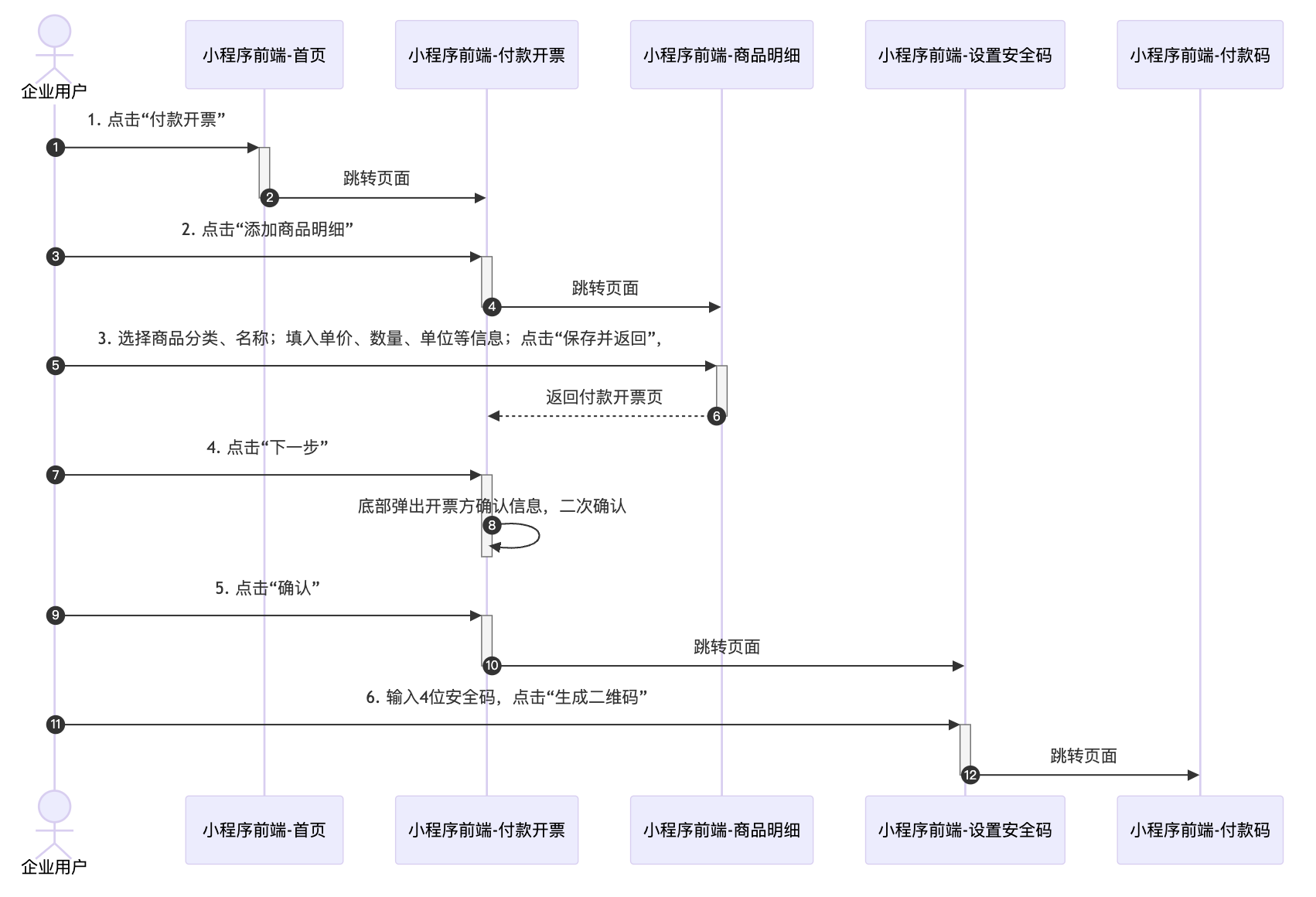
4.2 编写测试用例first_test.py ,内容如下:
1
2
3
4
5
6
7
8
9
10
11
12
13
14
15
16
17
18
19
20
21
22
23
24
25
26
27
28
29
30
31
32
33
34
35
36
37
38
39
40
41
42
43
44
45
46
47
48
49
50
| import time
import minium
import logging
class PayAndBillTest(minium.MiniTest):
def test_pay_and_bill_ui_op(self):
self.page.get_element("view", inner_text="付款开票").click()
self.assertTexts(["x'x'x"], "view")
if self.page.element_is_exists("view", inner_text="xxx-x'x'x"):
self.page.get_element("view", inner_text="xxx-xxx").click()
self.input_detail_op()
self.page.get_elements("button")[0].click()
time.sleep(1)
self.page.get_elements("button")[1].click()
time.sleep(1)
self.page.get_elements("button")[2].click()
time.sleep(1)
self.input_safe_code_op()
else:
self.assertTrue(False, "xxx-xxx 开票类型不存在")
def input_detail_op(self):
self.page.wait_for("page > view > view.content-container > view > button",max_timeout=2)
self.page.get_element("page > view > view.content-container > view > button").click()
self.page.get_element("page > view > view.cell-block > view:nth-child(1)").click()
self.page.get_element("view", inner_text="海水养殖、捕捞产品").click()
time.sleep(1)
self.page.get_element("view", inner_text="海水鱼").click()
self.page.get_element('input[aria-label="单价"]').input("1.01")
self.page.get_element('input[aria-label="数量"]').input("1")
self.page.get_element('input[aria-label="单位"]').input("2")
def input_safe_code_op(self):
self.page.get_element("input").input("1563")
self.page.get_elements("button")[0].click()
|
5. 执行测试用例
5.1 命令行执行单个用例
minitest -m test.first_test -c config.json -g
5.2 命令行执行测试计划
minitest -s suite.json -c config.json -g
6. 常见问题
- 执行报错
ignore module: test.first_test;- 添加__init__.py文件
- 如何快速获取元素
- 微信开发者工具,打开调试器右键选中元素,即可快速获取元素的 selector。

minitest 命令行
1
2
3
4
5
6
7
8
9
10
11
| -h, --help: 使用帮助。
-v, --version: 查看 minium 的版本。
-p PATH/--path PATH: 用例所在的文件夹,默认当前路径。
-m MODULE_PATH, --module MODULE_PATH: 用例的包名或者文件名
--case CASE_NAME: test_开头的用例名
-s SUITE, --suite SUITE:测试计划文件
-c CONFIG, --config CONFIG:配置文件名,配置项目参考配置文件
-g, --generate: 生成网页测试报告
--module_search_path [SYS_PATH_LIST [SYS_PATH_LIST ...]]: 添加 module 的搜索路径
-a, --accounts: 查看开发者工具当前登录的多账号, 需要通过 9420 端口,以自动化模式打开开发者工具
--mode RUN_MODE: 选择以parallel(并行)或者fork(复刻)的方式运行用例
|
文献
- minitest 官网
- python 菜鸟教程